Have you ever lost your mobile phone? Are you curious how to find my lost phone location or delete data from a stolen device? If so, you know how it feels after losing the phone. If not, then you should be cautious about your phone, and also know what to do if you lose your phone. If you have a lot of personal stuff, then there is a possibility of losing your mobile. Many people lose their phones due to personal stuff. If you lose your phone, then the one that who finds your mobile will use all of your data, contacts, and applications, so keep your phone securely. We are all human; we don’t have time to secure our mobiles, and we have mistakenly lost our phones. If you lost your phone, then don’t worry, we have the solution to delete your data from your mobile, and we will also help you find your mobile phone.
The good news is that today’s smartphones come with advanced security features that help you locate your lost phone, lock it, and even erase your data remotely to keep your information safe. In this complete guide, I will explain step-by-step how you can:
Why Finding a Lost Phone or Stolen Device is Important
It’s crucial to find a lost phone as quickly as possible. You may not know who found your phone and how that person will use your data.
Most people will try to contact you to return your phone, so always keep your photo on your wallpaper to let them know who you are. Keep some information, like your mobile number, on your lock screen wallpaper.
Some people may use your phone after erasing your data. In this case, your data will be safe, but your phone will be lost.
Here I’m giving you a key point on why it’s necessary to find your lost phone or stolen device is important
Your photos and videos
Social media accounts
Banking apps
Contact list
Emails and personal documents
Saved passwords
Your location history
How to Find Lost Android Phone Location or Stolen Device (Step‑by‑Step)
You’re sure that you take all of these steps. When you are missing your phone, you can get the peace of mind with it.
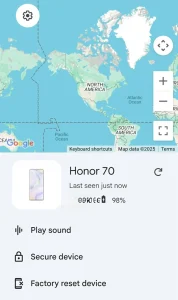
Google provides a free and official tool called Find My Device. You can use it from any computer or mobile browser. You can find your phone or delete data via Find My Device, or you can also use the Find My Device app on another Android device, or via the website here.
Log in with the same Google account that you used on the lost phone.
Step 2: Check Your Phone’s Location
Once logged in, Google will show:
Current location of your phone
Battery level
Wi-Fi or mobile network status
The device model and last seen time status
If the phone is online, you will see the exact or near location on Google Maps. If the phone is offline, you will see the last known location, and Google will update it automatically when the device reconnects to the internet.
Step 3: Play Sound (Even if the Phone Is on Silent)
You can click “Play Sound” to make your phone ring loudly for 5 minutes.
This is helpful when:
You lost the phone at home
It fell under a sofa or bed
Someone nearby has the phone
Step 4: Lock Your Phone Remotely
Click the “Secure Device” option.
You can:
Lock the screen
Add a custom message (e.g., “please return my phone call me on 1234567890.”)
Add a recovery phone number
This feature prevents others from opening your apps or checking your personal information.
Step 5: Erase / Delete Data From Your Lost or Stolen Android Phone
If you think your phone is stolen or not recoverable, click “Erase Device.”
This will:
Delete all photos
Remove all apps
Log out of your Google account
Reset the device to factory settings
Note: Before doing something, make sure that it is lost or not. You can use Find My Device to make a phone ring loudly for five minutes. After erasing the phone, you can no longer track its location. This step is the final step, so make sure to delete all data, as it enables you to locate your phone if it’s lost at home.
How to Find a Lost iPhone or Stolen iPhone (Step‑by‑Step)
Apple offers Find My iPhone. You can search “find my” on your iPhone search bar, you will find out built-in app provided by iPhone.
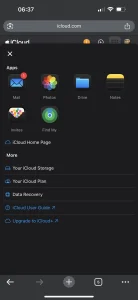
Step 1: Open iCloud.com
If you didn’t find the app on your iPhone, then you can visit the official iCloud website from any device and sign in with your Apple ID.
Step 2: Open “Find Devices”
Click on “Find Devices.”
You will see:
Current location
Your iPhone gadgets, like: earbuds
Then you will see your iPhone name, click on it, and inside that, you will see
Battery level
Device model
Last active time
Your iPhone will show on a map.
Play Sound
Click “Play Sound.”
Your iPhone will ring loudly,
Even if it is on Muted, silent mode, in vibration mode, whatever.
Put Your iPhone in Lost Mode.
Lost Mode allows you to:
Lock the phone
Display a custom message
Add a contact number
Track location updates
This is very useful if someone has found your phone and wants to return it. As I mentioned earlier, some people are honest. Especially with iPhones, unlocking a locked iPhone isn’t easy, so they have only two options: return the iPhone or throw it in the trash. haha
Erase Your iPhone Remotely
If you believe the phone is stolen, click “Erase.”
This will:
Delete all personal data
Remove accounts and app
Prevent thieves from accessing anything
Keep the phone activation locked
Even after deleting all the data from your iPhone, no one can use your iPhone until they open it with your Apple ID and Password.
Frequently Asked Questions regarding recovering a lost phone
1. Can I track my phone using just the IMEI number?
No, no one can track your phone through IMEI unless you report to the police.
2. Can I find my phone if it’s turned off?
You can see the last known location, and the map updates when the device turns on again.
3. Can thieves unlock my phone?
If you use a strong password and remote lock, it is extremely difficult. But on Android phones, they may be able to reset and unlock your phone.
4. If thieves reset and unlock my Android phone, can they access my data?
No, all your data will be automatically deleted after resetting.
5. Will remote erase delete everything?
Yes
6. Can I track a phone after factory reset?
No, tracking stops after the reset unless it is an iPhone (Activation Lock still works).
So what can you do Immediately After Your Phone Is Stolen?
You need to change the passwords of your email, Apple ID, Google ID and all your bank accounts as soon as possible. This step is the initial step to protecting all your accounts from thieves.
The second thing you need to do is log out from all the devices like Google, Apple and Facebook, as all platforms provide this feature.
Thirdly, you need to contact the SIM provider and have the SIM blocked, then request a new SIM card with the same number, so that your WhatsApp and bank OTPs remain secure.
Finally, if your phone is important and you want to get it back at any cost, then you can file a police complaint. But before filing a police report, you have to provide all the information, like ( IMEI number, Last known location, Model and color, Purchase details ) to increase chances of getting your phone back.
conclusion
Find My Device and Find My iPhone are extremely helpful in the initial stage of losing a phone. You can ring your phone, erase your data, and even track the location as long as the device is online.
These early actions can protect your personal information, but you must act fast as soon as you realize your phone is missing. Always keep Find My Device or Find My iPhone enabled, turn on daily data backup, and report the loss to the police with your IMEI number.
Following these steps increases your chances of find lost phone location or delete data from stolen device and recovering your phone and keeping your data safe.